

What's New in SQL Server ODBC Driver Version 2.1.x
SQL Server Bulk Copy Driver Extensions
- The SQL Server ODBC driver now supports the SQL Server bulk copy API extension, which enables you to develop client applications that rapidly add data rows to, or extract data rows from, a SQL Server table.
For more information about the SQL Server Bulk Copy Driver extensions, see the Easysoft SQL Server ODBC driver manual.
The SQL Server ODBC driver distribution also includes a command line bulk copy program which gives you the option of working with SQL Server data in bulk from scheduled jobs.
SQL Server Named Pipes
- SQL Server ODBC driver for Windows users can now use the Named Pipes connection protocol. This allows you to use the driver in SQL Server deployments where TCP/IP connections have been disabled or to take advantage of performance improvements in environments where Named Pipes is a more efficient connection method.
To use a Named Pipe connection, use this format for your
Serverattribute when configuring your ODBC data source:\\localhost\pipe\MSSQL$instance
For example:
\\localhost\pipe\MSSQL$sqlexpress
All versions of the SQL Server ODBC driver (i.e. Linux, UNIX and Windows) support TCP/IP connections to SQL Server.
What Was New in SQL Server ODBC Driver Version 2.0.x
- Windows Support Use our proven, supported SQL Server connector from Windows platforms.
- SQL Server 2019 Support Access SQL Server 2019 from Linux, Unix and Windows clients.
- XA Support Enlist SQL Server in a distributed XA transaction.
- Kernel 5 Support Connect to SQL Server 2000—2019 from the latest Linux distributions.
Windows Support
- Our new Windows driver enables users to connect Oracle to SQL Server from Windows using the same time-tested solution that's been relied on for this purpose on Linux and UNIX platforms for well over a decade.
ODBC is Microsoft's recommended interface for SQL Server and they provide a Windows ODBC driver to facilitate client access to the database. The Easysoft SQL Server ODBC driver extends the functionality provided by Microsoft's driver by providing additional connection string flags to smooth the integration between Oracle and SQL Server. For examples, flags that allow Oracle to work with certain SQL Server data types that would otherwise be incompatible. In addition, Easysoft's ODBC driver is supported. This means we can assist you both with the set up and ongoing maintenance of an Oracle SQL Server solution. We can change the driver to provide workarounds for customer roadblocks, often within days of a problem report. It's unlikely that Oracle or Microsoft will change their products to solve integration issues.
The Easysoft solution turns DG4ODBC, the free heterogeneous connectivity library that's distributed with Oracle, into a realistic option for customers who need to build a business critical application around Oracle and SQL Server. Given the growing number of users who rely on Easysoft for this purpose, it's an increasingly industry standard connectivity option.
The Windows driver has also been tested with a number of other popular applications on Windows. For example, Microsoft Office, Perl and PHP.
SQL Server 2019 Support
-
UTF-8 support SQL Server 2019 introduces full support for the widely used UTF-8 character encoding as an import or export encoding, and as database-level or column-level collation for string data (char and varchar data types). Choosing the UTF-8 encoding can significantly reduce the storage footprint of some character data.
If you want to take advantage of the UTF-8 storage benefits and let your ODBC applications access this data, you need to use an ODBC driver that supports this feature. With the SQL Server ODBC driver, all you need to do is add
UTF8DB = Yesto your data source or connection string and you're all set.
XA Support
- The SQL Server ODBC driver now supports XA transactions and allows an XA application, for example, Oracle Tuxedo, to start, commit or rollback a transaction branch that includes a SQL Server instance.
An XA transaction is a global transaction usually covering multiple resources. A global transaction involves several actions that are transactional in themselves, but that all must either complete successfully as a group, or all be rolled back as a group.
To develop the XA functionality in the driver, we worked closely with a customer to develop a solution that met an exacting set of requirements within a tight timescale. If you have a bespoke requirement such as XA support, please contact the Easysoft Sales team to discuss your requirements.
Kernel 5 Support
- Easysoft ODBC drivers on Linux are licensed by Kernel version rather than distribution. So, if a particular version of the SQL Server driver supports Kernel n then that driver will work on any Linux distribution based on Kernel n. Kernel 5.x support means that the SQL Server ODBC driver will work on the latest Linux distributions. Easysoft drivers are always backwards compatible, so they'll work on Linux distributions based on earlier Kernel versions as well.
Even if you don't have any Kernel 5 machines, with the Easysoft driver, you have the flexibility to upgrade in the future. For example, if you install the SQL Server ODBC driver on a Kernel 4 machine, you'll be able to upgrade the Linux distribution on that machine without affecting your SQL Server connectivity i.e. you won't to need to relicense or reinstall the Easysoft driver.
What Was New in SQL Server ODBC Driver Version 1.x
- SQL Server 2017 Support Access SQL Server 2017 from Linux and Unix.
- SQL Server 2016 Support Access SQL Server 2016 from Linux and Unix.
- ODBC 3.8 Support The latest version of ODBC enables you to stream SQL Server procedure output parameters, reducing application memory footprint.
- Query Notification Support Avoid database round-trips. Let SQL Server tell you when the data your Linux and Unix applications rely on has changed.
- SQL Server 2014 Support Access SQL Server 2014 and SQL Server 2014 Express from Linux and Unix.
- AlwaysOn Availability Groups High availability and disaster recovery for multiple SQL Server databases.
- Table-Valued Parameters Easily pass a table to a stored procedure as a parameter.
- Bulk Copy Import and export large amounts of data in and out of SQL Server databases from Linux and Unix.
- SQL Server 2012 Support Access SQL Server 2012 and SQL Server 2012 Express from Linux and Unix.
- Retrieve Procedure Output Parameters from PHP Access information returned from SQL Server stored procedures from PHP on Linux and Unix.
- Use Kerberos Authentication with Mirrored Databases Use Kerberos to authenticate the connection to a principal or a mirror server instance.
- SQL Server 2008 Support Access SQL Server 2008 and SQL Server 2008 Express from Linux and Unix.
- iconv Support Preserve character data integrity across multiple locales.
- AES, 3DES, DES Encryption Keep data transmitted between Linux/Unix and SQL Server secure with industry standard encryption.
- Transport Layer Security The latest and most secure version of SSL.
- SSL Cipher Suites Enforce security policy with SSL cipher suites.
- FIPS 140-2 Encryption Standards Connect Linux and Unix to FIPS 140-2 compliant SQL Server instances.
- NTLMv2 Authentication Protect sensitive, high-value data in your SQL Server database from unauthorised access.
- UTF-8 Support Preserve the integrity of Unicode SQL Server data on Linux and Unix systems.
- MARS Over SSL The only data access solution that lets Linux/Unix users take advantage of MARS now makes this important SQL Server feature available over an encrypted connection.
- Domain Discovery Reduce the amount of configuration needed to authorise Linux/Unix to SQL Server connections through Windows authentication.
- Microsoft SQL Server Driver Extensions Control SQL Server functionality from Linux/Unix with Microsoft’s recommended configuration methods.
SQL Server 2017 Support
- SSIS Packages to Linux Use the SQL Server ODBC driver to run an SSIS package from a Linux machine.
- Graph Databases Build and query tables that store graph entities from your Linux applications.
- Python Integration Run Python scripts under SQL Server either from Python on Linux or any other ODBC-compliant application.
- Database Engine Enhancements Because ODBC is Microsoft's recommended interface for SQL Server, SQL Server ODBC driver users can automatically take advantage of database engine enhancements such as resumable Online Index rebuilds, the Identity Cache, Adaptive Query Processing and new SQL functions (e.g. TRIM, CONCAT_WS, TRANSLATE, and STRING_AGG).
- SQL Server on Linux Use the SQL Server ODBC driver to connect Linux applications to the Linux port of SQL Server.
SQL Server 2016 Support
Easysoft is the first ISV to enable Linux and Unix users take advantage of SQL Server 2016 features such as:
-
Always Encrypted Columns The SQL Server ODBC driver enables you to update and query data held in Always Encrypted columns.
Always Encrypted protects SQL Server data at the point at which it is most susceptible to attack: when that data is being used. For example, during transactions and computations. This differs from existing SQL Server encryption features as they require data to be decrypted before operations can be performed on it.
The encryption key that protects Always Encrypted columns is stored on the application machine. This means that SQL Server cannot decrypt the Always Encrypted data. If the SQL Server machine is compromised, the attacker will only be able to access Always Encrypted data in cipher form.
As people are increasingly concerned that their data is safe in the cloud, Always Encrypted will be available in Azure SQL, the cloud-based pay-as-you-go version of SQL Server. Easysoft's ODBC driver for Azure SQL also supports Always Encrypted therefore.
- Dynamic Data Masking Protect SQL Server data by obscuring some or all of a column's contents. For example, expose the last four digits of a credit card number or obscure data held in a salary column.
- JSON Support Exchange data between SQL Server and NoSQL databases.
- Row-Level Security Transparently filter rows from result sets when users are not authorised to see data held in those rows.
See Also
ODBC 3.8 Support
ODBC 3.8, the latest version of this data access interface, enables procedure output parameters to be retrieved in parts. Because this feature is extremely valuable for SQL Server users who need to reduce application memory footprint when retrieving varbinary(max), varchar(max), and nvarchar(max) types from a stored procedure, we have added support for this to our SQL Server ODBC driver. This further aligns our driver with Microsoft's SQL Server Native Client and is the only way in which Linux and UNIX users can take advantage of this feature. We provide a SQL Server specific example for streamed output parameters in our C samples section.
Query Notification Support
To ensure your users have access to the latest SQL Server data, your Linux and Unix applications may:
- Retrieve the results from the database every time your users issue a query, which increases database round-trips, and is an inefficient use of resources.
- Use a caching mechanism. Once a query is run, the data is subsequently retrieved from the application's local cache. Although this reduces database round-trips, your application has no way of knowing whether the cached data is stale and so must periodically update the cache with new values from the database, irrespective of whether the remote data has changed or not.
SQL Server Query Notifications let your applications ask SQL Server to notify them when critical data has changed, which reduces database round-trips and removes the guesswork from the question of how often the cache should be refreshed.
See Also
SQL Server 2014 Support
Easysoft is the first ISV to enable Linux and Unix users take advantage of SQL Server 2014 features such as:
-
In-Memory Tables SQL Server 2014 lets you move specific tables (and stored procedures) into memory to minimise I/O overheads and improve the performance of your online transaction processing (OLTP) applications. According to Microsoft, some applications can expect to run up to twenty times faster when run against in-memory tables.
In-memory tables enable you use a familiar database platform to manage your data in near real time without having to buy specialised hardware or rewrite your applications.
Workloads run in parallel will fully realise the performance improvement offered by in-memory tables. For example, an application that uses multiple threads to execute a T-SQL statement in parallel will see a significant performance increase. The SQL Server ODBC driver is thread-safe and can safely be used with a multi-threaded application, enabling Linux and Unix users to fully take advantage of the concurrency benefits provided by in-memory tables. For a sample multi-threaded application that demonstrates this, see this Knowledge Base article.
We ran the sample ODBC application described in the article to execute a workload against both an on-disk and an in-memory version of a table:
$ time ./DemoInsertSalesOrders
Starting test...Finished test

real    0m24.245s

$ time ./DemoInsertSalesOrders
Starting test...Finished test

real    0m3.607s
The time taken for the workload to complete is significantly less when run against an in-memory table, demonstrating that in-memory tables improve performance without requiring applications to be modified.
-
Updateable Columnstore Indexes Columnstore indexes, another of Microsoft's high performance in-memory technologies, were introduced in SQL Server 2012 to significantly improve performance for data warehousing types of queries. SQL Server 2014 enhances columnstore indexes with the introduction of clustered columnstore indexes. With clustered clustered columnstore indexes, unlike their SQL Server 2012 predecessor, the underlying table can be updateable.
When testing our SQL Server ODBC Driver against a SQL Server 2014 data warehouse, our test team found performance benefits both when querying and updating tables that had clustered columnstore indexes. For example, we copied 1 million records from one table in the data warehouse to another by running the following SQL in
isql, the ODBC application included with the SQL Server ODBC Driver.set statistics io on set statistics time on set identity_insert dbo.FactOnlineSales ON insert into dbo.FactOnlineSales (OnlineSalesKey, DateKey, StoreKey, ProductKey, PromotionKey, CurrencyKey, CustomerKey, SalesOrderNumber, SalesOrderLineNumber, SalesQuantity, SalesAmount, ReturnQuantity, ReturnAmount, DiscountQuantity, DiscountAmount, TotalCost, UnitCost, UnitPrice, ETLLoadID, LoadDate, UpdateDate) SELECT [OnlineSalesKey] ,[DateKey] ,[StoreKey] ,[ProductKey] ,[PromotionKey] ,[CurrencyKey] ,[CustomerKey] ,[SalesOrderNumber] ,[SalesOrderLineNumber] ,[SalesQuantity] ,[SalesAmount] ,[ReturnQuantity] ,[ReturnAmount] ,[DiscountQuantity] ,[DiscountAmount] ,[TotalCost] ,[UnitCost] ,[UnitPrice] ,[ETLLoadID] ,[LoadDate] ,[UpdateDate] FROM [ContosoRetailDW].[dbo].[FactOnlineSales_Top_Million] order by OnlineSalesKey set identity_insert dbo.FactOnlineSales OFF
We ran this SQL two times. Before running the SQL for the second time, we created a clustered columnstore index on the FactOnlineSales table.
SQL> set statistics io on set statistics time on ...
[01000][Easysoft][SQL Server Driver 12.0][SQL Server]
 SQL Server Execution Times:
   CPU time = 39046 ms,  elapsed time = 38200 ms.
The time taken for the inserts to complete is signficantly less with the table with the clustered columnstore index:
SQL> set statistics io on set statistics time on ...
[01000][Easysoft][SQL Server Driver 12.0][SQL Server]
 SQL Server Execution Times:
   CPU time = 10984 ms,  elapsed time = 11377 ms.
-
New security features SQL Server 2014 introduces new security permissions that allow server roles to be set up, which allow database administrators to perform their duties but not see the underlying user data. (These are part of a set of SQL Server features that facilitate the separation of duties to minimise the possibility of error and fraud, by distributing privileges among users or roles, so that no one user or role has complete control over a business process or a piece of software).
These new permissions are:
- CONNECT ANY DATABASE
- IMPERSONATE ANY LOGIN
- SELECT ALL USER SECURABLES
The SQL Server ODBC driver supports these permissions.
AlwaysOn Availability Groups
AlwaysOn Availability Groups, introduced in SQL Server 2012, provide high availability and disaster recovery for multiple SQL Server databases without the need for a shared storage SAN. AlwaysOn Availability Groups help organisations maximise IT investments by making full use of standby hardware for read-only workloads. This improves performance on the primary database because read-only workloads can be offloaded to a secondary replica.
SQL Server 2012 supports a maximum of four secondary replicas. SQL Server 2014 supports up to eight secondary replicas.
The SQL Server ODBC driver supports AlwaysOn Availability Groups by providing two new connection string settings: MultiSubnetFailover, which provides faster detection of and connection to the primary database server and ApplicationIntent, which lets SQL Server know that a read-only connection is required and can be offloaded to a secondary replica.
Table-Valued Parameters
The SQL Server ODBC driver now supports table-valued parameters. Table-valued parameters, introduced in SQL Server 2008, are an efficient mechanism that allows you to send a batch of data in a single round trip. You can use table-valued parameters to send multiple rows of data to a Transact-SQL statement or a routine, such as a stored procedure or function, without creating a temporary table.
See Also
Bulk Copy
The SQL Server ODBC driver distribution now includes a bulk copy program (bcp), which lets you import and export large amounts of data in and out of SQL Server databases from Linux and Unix.
bcp enables you to import data exported from client applications directly from Linux and Unix machines. You do not need to copy the exported data file to a Windows machine or make the file accessible to Windows.
If you need to copy SQL Server data regularly, you can rerun your bcp commands by running them from Linux and Unix administration tools such as cron.
The Easysoft bulk copy program is based on the one provided by Microsoft and so users who have already used the Microsoft utility will be able to reuse existing knowledge when using the one from Easysoft.
See Also
- The Easysoft Bulk Copy tutorial
SQL Server 2012 Support
The SQL Server ODBC driver lets Linux and Unix users take advantage of SQL Server 2012 features such as:
- Contained databases, which simplify the process of moving databases from one SQL Server instance to another by removing dependencies on the instance such as SQL Server logins.
- Sequence objects, which operate in a similar way to an identity column, but the sequence numbers are not restricted to use in a single table.
- Statistical Semantic Search, which provides insight into unstructured data stored in SQL Server databases by extracting statistically relevant key phrases, and then, based on these phrases, identifying similar documents.
- The EXECUTE statement's WITH RESULT SETS clause, which lets you specify the metadata returned from the statement, such as changing the names and data types of the returned result set.
- UTF-16 Supplementary Characters (SC) Collations, which encode Unicode characters in the UTF-16 format.
- User-defined server roles, a security enhancement, which enables DBAs to define and assign server level permissions.
- New and enhanced spatial features, conversion functions, date and time functions, logical functions and string functions.
See Also
- The Easysoft Contained databases tutorial
Retrieve Procedure Output Parameters from PHP
The SQL Server ODBC driver supports the PHP ODBC interfaces Unified ODBC and PDO_ODBC. PDO_ODBC, unlike the Unified ODBC extension, provides direct support for procedure output parameters and when used in conjunction with the SQL Server ODBC driver enables output parameter values to be retrieved from PHP on Linux and Unix platforms.
See Also
- Retrieving SQL Server Procedure Output Parameters section in the Easysoft PHP and SQL Server tutorial
Use Kerberos Authentication with Mirrored Databases
The SQL Server ODBC driver maintains data availability by transparently connecting to the failover partner for a mirrored database if the initial partner is unavailable when an application connects. (Database mirroring is a feature introduced in SQL Server 2005 that increases data availability by creating a standby copy of a database.)
The SQL Server ODBC driver's Kerberos support includes connection string attributes that let you specify the Service Principal Name (SPN) for a principal or a mirror server instance, enabling you to use Kerberos authentication with mirrored databases.
(The SQL Server ODBC driver enables SQL Server to be accessed as a Kerberos service from Linux and Unix platforms. This provides the benefits of centralised authentication to Linux/Unix based SQL Server users. Centralised authentication makes it unnecessary for users to remember multiple passwords and for security administrators to protect multiple password repositories.)
See Also
- Kerberos and Database Mirroring section in the Easysoft Kerberos tutorial
SQL Server 2008 Support
The SQL Server ODBC driver supports SQL Server 2008 and SQL Server 2008 Express, and can connect 32-bit and 64-bit Unix (AIX, HP-UX and Solaris) and Linux (CentOS, Debian GNU/Linux, Fedora, Kubuntu/Ubuntu, Mandrake/Mandriva, OpenSUSE/SUSE, RedHat, RedHat Enterprise Linux (RHEL), Slackware and so on) machines to SQL Server 2008 (Katmai) databases. In solutions built around the SQL Server ODBC driver therefore, the database platform does not dictate the client application platform.
For example, you want to analyse customer location information visually and are considering using SQL Server 2008 as your database backend because it supports spatial data. You use Ruby on Rails on Linux to develop your client applications for its ease of use and accelerated application development time on this cost-effective platform. The SQL Server ODBC driver transparently integrates SQL Server features with applications running on Linux/Unix such as Ruby on Rails. This means that you can evaluate SQL Server solely on the benefits its features brings to your organisation, the database platform does not have any implications for your choice of client application platform.
Our driver’s SQL Server 2008 feature support includes:
-
SQL Server 2008 Data Types Our driver enables Linux/Unix applications to take advantage of the new SQL Server 2008 data types:
-
GEOGRAPHY and GEOMETRY Enables spatial data that describes physical locations to be stored in a SQL Server 2008 database. The GEOGRAPHY data type lets you represent three-dimensional (round-earth) data such as as GPS latitude and longitude coordinates. The GEOMETRY data type lets you represent two-dimensional (flat-earth) data such as as points on a map.
Applications can use spatial data for a variety of tasks: retrieving the name of the salesperson who lives closest to a particular customer; calculating the optimal route for a pallet pick run; keeping track of the current locations of the participants in a multi-player game; predicting the arrival times of buses and trains; performing CAD modelling of an interior space.
The SQL Server ODBC driver enables organisations to gain competitive advantage through the analysis of spatial data stored in SQL Server while protecting their investment in Linux/Unix applications. For example, the 64-bit SQL Server ODBC driver can enable a 64-bit CAD application on Linux to increase design precision by overlaying detailed spatial data stored in SQL Server. The performance benefits for the memory-intensive CAD application are retained on this cost-effective 64-bit platform, and legal and customer obligations are met, through improved design accuracy.
- DATE, TIME, DATETIME2 and DATETIMEOFFSET The DATE and TIME data types allow a date to be stored without a time value and vice versa, enabling you to work with just the point in time portion that you need. For example, you can now store information about a particular time that does not relate to a specific date. The DATETIME2 references the Coordinated Universal Time (UTC) instead of the system time for greater accuracy and can store date and time data to a precision of 100 nanoseconds. The DATETIMEOFFSET data type introduces time zone support by storing date, time and offset such as 'plus 5 hours'. This helps organisations whose business is distributed globally develop applications that can handle time zone conversion between different locales. For example, an application might use the DATETIMEOFFSET data type to report whether a service that is open from 9:00 A.M. through 5:00 P.M. in one time zone is currently open for business, whatever the local time in the location the application is being run from.
- FILESTREAM Enables binary large object (BLOB) data to be stored externally on the Windows file system instead of in the database file. FILESTREAM data is still under the control of SQL Server, and so you can retain database engine functionality such as backing up, restoring and controlling access to the data while taking advantage of low cost hardware to store the data. The SQL Server ODBC driver’s FILESTREAM support enables you to use SELECT, INSERT, UPDATE and DELETE statements in your Linux/Unix applications to manipulate binary data stored on remote Windows file systems.
- HIERARCHYID Enables tree-like structures, such as organisational hierarchies, to be represented in the database without the need for complex SQL. The HIERARCHYID data type and its associated methods make it easy to find out a database record’s position in the hierarchy. For example, in an employees table, the data type’s methods can be used to find out who a particular employee reports to.
-
GEOGRAPHY and GEOMETRY Enables spatial data that describes physical locations to be stored in a SQL Server 2008 database. The GEOGRAPHY data type lets you represent three-dimensional (round-earth) data such as as GPS latitude and longitude coordinates. The GEOMETRY data type lets you represent two-dimensional (flat-earth) data such as as points on a map.
-
SQL Server 2008 Security The SQL Server ODBC driver’s Windows authentication support means that using the driver to integrate Linux/Unix with SQL Server 2008 will not compromise security best practices defined and enforced by SQL Server 2008’s Policy-Based Management. Because the SQL Server ODBC driver lets you access SQL Server from Linux/Unix by using this best practice login mode, SQL Server authentication support is not a prerequisite for our driver. Your SQL Server instance does not therefore have to vulnerable to attacks associated with this legacy authentication mode.
Transparent Data Encryption (TDE) is a SQL Server 2008 feature that enables data to be stored securely by encrypting the database files. If the disks that contain the files become compromised, data in those files is protected because that data can only be de-encrypted by authorised personnel who have the correct certificate. However, TDE does not encrypt data as it is transmitted to and from SQL Server over the network. To do this, and add to your defense-in-depth security strategy, use the SQL Server ODBC driver’s SSL support to secure the network connection. The driver’s SSL Cipher Suite support means that you can specify the same encryption algorithm and strength to protect data in transit as you do to protect your database files with TDE.
The SQL Server ODBC driver enables you to identify your Linux/Unix applications to SQL Server by setting the Appname data source attribute. You can therefore use the SQL Server auditing mechanisms, including the SQL Server 2008 Audit Object, to check that users are using the applications they are supposed to be using when accessing SQL Server from Linux/Unix.
- SQL Server 2008 Native Client Attributes To ensure the SQL Server ODBC driver keeps up to date with Microsoft’s SQL Server Native Client and can replicate that Windows-only software’s functionality on Linux/Unix, our driver supports the new SQL Server 2008 Native Client attribute SQL_SS_TABLE.
Whatever your organisation’s plans for SQL Server 2008 migration are, you can be confident that the Easysoft ODBC-SQL Server Driver is a future proof solution that integrates SQL Server 7.0, SQL Server 2000, SQL Server 2005 and SQL Server 2008 with Unix and Linux.
iconv Support
To help support the character sets in use throughout our worldwide user base, the SQL Server ODBC driver can now use iconv to convert character data from the encoding used by SQL Server to the various encodings used by Linux/Unix client machines (UTF-8, EUC-CN, EUC-JP, EUC-KR, EUC-TW and so on). This feature can help solve the data integrity issues (data loss/corruption) that face organisations who want to increase revenue by developing solutions for international markets.
To use the SQL Server ODBC driver’s conversion mechanism, specify the encoding used by your client machine with the Client_CSet data source attribute. The SQL Server ODBC driver converts character data to the encoding you specify (assuming the characters are present in the target encoding). Do this if you experience character loss or corruption in your application, for example, when the expected characters are replaced by question marks (?).
The SQL Server ODBC driver’s iconv support means that you can build flexible solutions around the driver that will always have a mechanism for converting data to the client system’s encoding, whatever country the solution is deployed in.
See Also
Client_CSetattribute in the SQL Server ODBC driver User’s Guide
AES, 3DES and DES Encryption
The SQL Server ODBC driver now lets you protect the confidentiality of SQL Server data with the following encryption algorithms: Advanced Encryption Standard (AES), Data Encryption Standard (DES) and Triple-DES (3DES).
- AES encryption AES is the current U.S. government encryption standard. AES is so secure that it is used to protect information classified by the U.S government as TOP SECRET. Assuming the maximum level of encryption (256-bit) is used, cracking AES-encrypted data using the only known cryptanalysis attack (brute force) is currently impossible.
- DES and 3DES encryption DES is the former U.S. government encryption standard. 3DES is a more secure variant of DES, which encrypts data with three passes of the DES algorithm. 3DES support is a prerequisite for access to SQL Server instances running in FIPS 140-2 compliance mode.
Encryption protects data privacy by rendering it unreadable to all but the intended recipient, who has the ability to decrypt the data.
Using encryption to protect the privacy of sensitive, high value data as it is sent across the network is a SQL Server security best practice.
The SQL Server ODBC driver also supports Rivest Cipher 4 (RC4) encryption.
From its initial release, the SQL Server ODBC driver’s built-in support for encryption has protected our security conscious customer’s data without requiring any change to client applications. The driver’s improved encryption support guarantees conformance with security policies that are obligated to use older encryption standards such as DES while retaining the potential to integrate with the most recent encryption standard. You can therefore be confident that choosing the SQL Server ODBC driver to solve your Linux to SQL Server connectivity issues will not compromise current or future security obligations. The SQL Server ODBC driver’s comprehensive support for encryption (and data integrity) standards means that it will not introduce a weak link into your security solution and can safely be deployed in the context of a defence in depth security strategy.
See Also
Cypherattribute in the SQL Server ODBC driver User’s Guide
Transport Layer Security
The SQL Server ODBC driver can secure the connection to SQL Server instances by using both Secure Sockets Layer (SSL) and Transport Layer Security (TLS). TLS is the latest version of SSL. TLS is more secure than SSL because it uses stronger hash function techniques (Hashed Message Authentication Code or HMAC) to ensure that data retains its integrity from the time it is sent to the time is is received.
The stronger the data integrity mechanism, the more protection your SQL Server data has against attacks such as tampering, interception and forgery. For example, without data integrity protection, data is vulnerable to:
- Data modification attacks: Data is intercepted in transit, altered and retransmitted, for example, a £100 bank deposit is intercepted, changed to £10,000 and retransmitted.
- Data replay attacks: Data is captured and then repeatedly retransmitted, for example, a bank withdrawal of £100 is intercepted and retransmitted ten times so that the final withdrawal amount equals £1000.
SSL Cipher Suites
By default, the SQL Server ODBC driver and SQL Server machine automatically handle the choice of encryption and data integrity algorithm used to protect data exchanged between the machines. If you have a specific security policy at your site, you can configure the SQL Server ODBC driver to request an SSL cipher suite that corresponds with your security requirements. For example, you can use a cipher suite to ensure the SSL connection to the SQL Server machine meets security policy requirements regarding acceptable encryption algorithms.
An SSL cipher suite is a set of authentication, encryption and data integrity algorithms used to protect data exchanged between machines.
The SQL Server ODBC driver’s support for SSL cipher suites means that you can now use different encryption algorithms to protect different database connections. For example, you need to protect your most sensitive data with Triple-DES encryption; because of the performance overhead associated with Triple-DES, your security policy also permits you protect the privacy of less sensitive data with DES. To meet your security-related obligations while retaining control over the trade-off between security level and performance, the SQL Server ODBC driver allows you to choose Triple-DES encryption for connections to some databases and DES encryption for others.
By specifying SSL settings with a cipher suite, rather than letting the driver and SQL Server machine negotiate the settings, you can apply a consistent security policy across different SQL Server machines. For example, when connecting to SQL Server instances running on different Windows platforms, the negotiated SSL settings may not be the same on all machines or consistently satisfy your security requirements.
See Also
Cypherattribute in the SQL Server ODBC driver User’s Guide
FIPS 140-2 Encryption Standards
The SQL Server ODBC driver supports the Federal Information Processing Standard (FIPS) approved algorithms (AES, DES, 3DES and SHA-1) and can connect Linux and Unix clients to SQL Server instances running in FIPS 140-2 compliance mode.
FIPS 140-2 is a U.S. government standard, published by the National Institute of Standards and Technology (NIST), that defines security requirements for cryptographic software. Some U.S. government agencies can only purchase FIPS 140-2 certified products. Many private companies are required by U.S. government regulation to use FIPS 140-2 certified products. Organisations and companies who do not have to use FIPS 140-2 certified products to address regulatory compliance issues still value the certification, as it is carried out by NIST, an independent third party.
AES, which the SQL Server ODBC driver also supports, is another FIPS standard (FIPS-197).
Because the SQL Server ODBC driver supports government-approved encryption and data integrity standards, it can be deployed in environments where security requirements are defined by regulatory compliance obligations, such as FIPS 140-2 conformance.
See Also
Cypherattribute in the SQL Server ODBC driver User’s Guide
NTLMv2 Authentication
The SQL Server ODBC driver supports Windows Authentication, a SQL Server authentication mode that allows users to log into SQL Server with their Windows accounts. Because it centralises authentication (password checking happens in one place; one system to define password strength, expiration and account lockout policy), Windows Authentication is Microsoft’s recommended authentication mode. Because no passwords are sent across the network during the authentication process, Windows Authentication is secure and a SQL Server security best practice.
NT LAN Manager version 2 (NTLMv2) is a challenge/response authentication protocol supported by Windows. When the SQL Server ODBC driver attempts to authenticate a Windows user, Windows "challenges" the driver to do a complex calculation that proves it has access to the user’s password and "respond" with the results. Windows does the same calculation. If the two calculations agree, Windows authenticates the user, who can then access SQL Server. Because of the strength of its challenge/response mechanism, NTLMv2 is more secure than older versions of the protocol and provides a greater defence against attempts to crack passwords by capturing the challenge/response.
By simplifying password management, Windows Authentication reduces the support burden and IT administration costs associated with managing user accounts. NTLMv2 enhances the security of this authentication mode, protecting sensitive, high-value data in your SQL Server database from unauthorised access.
The SQL Server ODBC driver supports both NTLMv2 and its predecessor NTLM.
The SQL Server ODBC driver also supports SQL Server authentication, which enables users to access SQL Server by using a SQL Server login account. To prevent a weakness inherent in this authentication mode from being exploited, the SQL Server ODBC driver can also encrypt the SQL Server login ID and password as they are passed over the network. Doing this is a SQL Server security best practice.
See Also
NTLMv2attribute in the SQL Server ODBC driver User’s Guide
UTF-8 Support
SQL Server supports the Unicode standard, enabling the database to store and process multilingual data. SQL Server uses the UCS-2 encoding scheme to store Unicode data. An encoding scheme defines how Unicode data is stored as a sequence of bytes. There are multiple Unicode encoding schemes.
The SQL Server ODBC driver conforms with the ODBC specification’s requirements for a Unicode ODBC driver. This means that the driver supports Unicode data types and Unicode versions of the ODBC API, which accept and return Unicode data. The Unicode encoding scheme that ODBC expects is UCS-2, which is the same as SQL Server.
However, many Linux and Unix systems use a different encoding scheme to SQL Server and ODBC: UTF-8. This means that the ODBC mechanism for working with Unicode data is unsuitable and unless the application is able to convert between encoding schemes, data corruption may occur.
To enable Linux and Unix applications to work with Unicode SQL Server data without loss or corruption, the SQL Server ODBC driver can now convert UCS-2 encoded data to UTF-8.
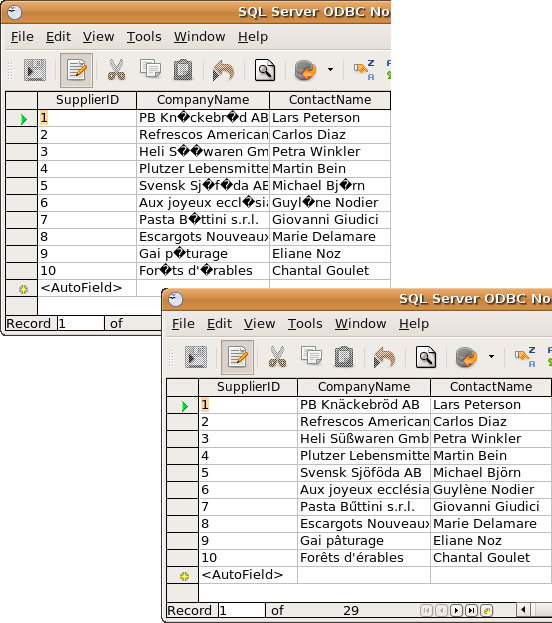
This screen shot shows how the SQL Server ODBC driver’s UCS-2 to UTF-8 conversion mechanism enables a popular Linux application, OpenOffice.org, to process Unicode data stored in the Northwind database. Before enabling UTF-8 support in the driver, certain characters are replaced with ? symbols, indicating that the data has been lost because of incompatible encoding schemes on the client and server machines.
See Also
ConvToUtfattribute in the SQL Server ODBC driver User’s Guide
MARS Over SSL
We believe that there should be no differentiation between Windows and Linux/Unix users in terms of SQL Server feature availability. As part of this commitment, the SQL Server ODBC driver has supported Multiple Active Results Sets (MARS) since the driver’s initial release. Our driver is the only Linux/Unix SQL Server ODBC driver to support MARS, and therefore the only solution that lets Linux/Unix users take advantage of this feature.
MARS is a SQL Server 2005 feature that simplifies application design by allowing multiple operations to be performed on a single connection. For example, applications can execute other statements (such as INSERT, UPDATE and DELETE statements) while results sets are open. This removes the need for applications to deal with "connection busy" errors or use previous workarounds such as multiple connections or server-side cursors, both potentially expensive operations that can hurt performance.
As part of our ongoing commitment to meeting data access requirements without compromising our customer’s current or future security plans, the SSL version of the SQL Server ODBC driver now supports MARS. This important SQL Server feature is now available to Linux/Unix users over an encrypted network connection therefore.
Domain Discovery
The SQL Server ODBC driver enables Linux and Unix users to access SQL Server by using a Windows domain user account. To authenticate a user by using a domain account, the SQL Server ODBC driver needs to know which domain the account belongs to. Previously, this information was supplied as a SQL Server ODBC driver configuration setting. The SQL Server ODBC driver can now detect the domain automatically.
Automatic domain discovery reduces the amount of configuration needed to connect your Linux and Unix applications to SQL Server. The facility also ensures that any changes you make to your domain structure will not require SQL Server driver reconfiguration on your Linux and Unix clients.
Microsoft SQL Server Driver Extensions
To align our driver with Microsoft’s SQL Native Client driver and ensure that SQL Server features are available to Linux and Unix applications, the SQL Server ODBC driver now supports these Microsoft driver extensions:
- SQL_COPT_SS_PRESERVE_CURSORS This attribute reports and controls how cursors behave at the end of a transaction in manual-commit mode. Using SQL_COPT_SS_PRESERVE_CURSORS is the only method that Microsoft support for client machines to control this cursor behaviour. The SQL Server ODBC driver’s support for SQL_COPT_SS_PRESERVE_CURSORS is a prerequisite for manipulating this functionality from Linux/Unix machines therefore.
- SQL_COPT_SS_INTEGRATED_SECURITY This connection attribute lets you control which authentication mode should be used to validate a SQL Server login. SQL_COPT_SS_INTEGRATED_SECURITY enables this functionality to be manipulated programmatically through SQLSetConnectAttr, supplementing existing data source/connection string attributes for specifying the authentication mode. The facility to specify the authentication mode gives the SQL Server ODBC driver the flexibility to support both Microsoft’s preferred and legacy SQL Server authentication mechanisms: Windows Authentication and SQL Server Authentication.
- SQL_SOPT_SS_DEFER_PREPARE Prepared execution provides an efficient way to execute a SQL statement multiple times. Prepared execution separates SQL statement processing into two separate stages: compilation (or preparation) and execution. A statement does not have to be compiled each time it is executed therefore, reducing the overhead associated with this operation. SQL Server 2000 and later provides native support for prepared execution. Unlike ODBC’s prepared execution model, the default behaviour for this native implementation is to defer statement preparation until execution. Any errors in the statement being prepared are not known until the statement is executed. Some applications may not be able to handle SQL errors if they are returned at the point when the statement is executed rather than prepared. SQL_SOPT_SS_DEFER_PREPARE provides a workaround for applications that expect the ODBC behaviour for prepared execution. The attribute allows you to control whether a statement is prepared immediately (errors are returned at this stage) or deferred until execution.


